# list
List items container.
# Children Elements
Only the list-item elements are supported as children nodes.
# Attributes
In addition to the common attributes, this element may contain the following attributes.
# scrollpage
Page scroll activation/deactivation.
- Type:
boolean - Default value:
false - Mandatory: no
Activate/deactivate the scroll on the rest of the page elements, including those out of the list. Enabling this attribute will compromise the list rendering performance.
WARNING
The scrollpage attribute is not supported if the list is horizontal.
# CSS Properties
In addition to the common styles, this element supports the following styling properties:
# flex-direction
Sets the direction of the main flex container and specifies how the list-item children are placed in the list.
- Type:
string(column,row,row-reverse,column-reverse) - Default value:
column - Mandatory: no
# columns
Number of displayed columns.
- Type:
number - Default value:
1 - Mandatory: no
# layout-type
Type of the layout of the list.
- Type:
string(grid,stagger) - Default value:
grid - Mandatory: no
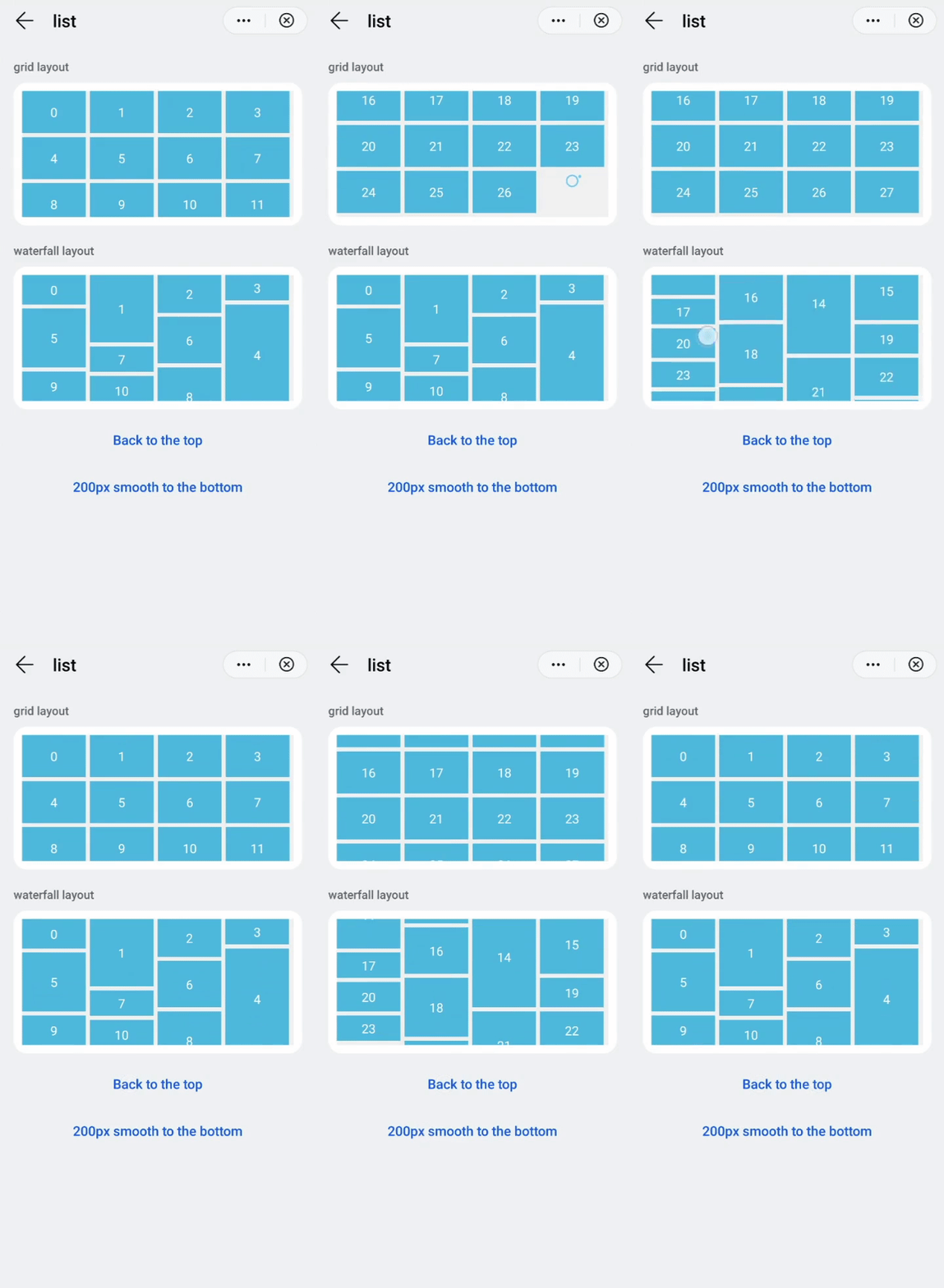
The layout style could be grid, in case of a grid style, and stagger for a waterfall style (where the height of each list-item can be customized).
# Events
In addition to the common events, this element supports the following events:
# scroll
Indicates if the list is scrolling.
Additional parameters:
{ scrollX: integer, scrollY: integer, scrollState: integer }
The state of the scroll (scrollState) could be:
0when the list is not scrolling,1when the list is scrolling, and2when the list is scrolling and the user already is interacting with the list.
# scrollbottom
A list is scrolled to the bottom.
Additional parameters: no
# scrolltop
A list is scrolled to the top.
Additional parameters: no
# scrollend
A list stops scrolling.
Additional parameters: no
# scrolltouchup
A list is scrolling inertially after the user stops the interaction with the list.
Additional parameters: no
# Methods
This element has the following methods:
# scrollTo({index, smooth, behavior})
Scrolls a list to the position of a specified list-item.
Parameters:
objectwith the following attributes:index: integer(mandatory). The index of the targetlist-itemto scroll to.smooth: boolean. To enable smooth scrolling (falseby default).behavior: string. Equivalent to thesmoothparameter. The value can be:smooth,instant, orauto(autoby default, that behaves asinstant).
# scrollBy({dx, dy, smooth} | {left, top, behavior})
Scrolls a list using an offset.
Parameters:
- Either an
objectwith the following attributes:dx: integer. Horizontal scrolling offset inpx(0by default).dy: integer. Vertical scrolling offset inpx.smooth: boolean. Scroll a list smoothly or not (trueby default).
- Or an
objectwith the following attributes:left: integer. Horizontal scrolling offset inpx(0by default). If the value is positive, the list scrolls to the left. If the value is negative, the list scrolls to the right. This parameter does not take effect whenflex-directionis set tocolumnorcolumn-reverse.top: integerVertical scrolling offset inpx(0by default). If the value is positive, the list scrolls upwards. If the value is negative, the list scrolls downwards. This parameter does not take effect whenflex-directionis set toroworrow-reverse.behavior: string| Indicates whether to enable smooth scrolling. Value can besmooth,instant, orauto(by default which behaves likeinstant).
# Example
<template>
  <div class="container">
    <div class="case-title mt-item">
      <text class="title">grid layout</text>
    </div>
    <div class="item-container">
      <list class="list grid" onscrollbottom="gridScrollBottom" id="list">
        <list-item class="list-item bg-blue" type="grid" for="(index,gridItem) in list1">
          <text class="color-white">{{index}}</text>
        </list-item>
        <list-item class="list-item" type="grid">
          <progress class="progress" type="circular"></progress>
        </list-item>
      </list>
    </div>
    <div class="case-title mt-item">
      <text class="title">waterfall layout</text>
    </div>
    <div class="item-container">
      <list class="list stagger" onscrollbottom="staggerScrollBottom" id="listStagger">
        <list-item class="list-item bg-blue" style="height:{{gridItem.height}}px;" type="stagger" for="(index,gridItem) in list2">
          <text class="color-white">{{index}}</text>
        </list-item>
        <list-item class="list-item" type="stagger">
          <progress class="progress" type="circular"></progress>
        </list-item>
      </list>
    </div>
    <div class="row-center mt-btn">
      <text class="btn-transparent" onclick="scrollTop">Back to the top</text>
    </div>
    <div class="row-center mt-btn">
      <text class="btn-transparent" onclick="scrollDown">200px smooth down</text>
    </div>
  </div>
</template>

<style lang="sass">
  @import '../../../Common/css/common.scss';
  @import '../../../Common/css/button.scss';
  .list {
    height: 300px;
    background-color: #f1f1f1;
    columns: 4;
    .list-item {
      margin-right: 10px;
      margin-bottom: 10px;
      justify-content: center;
    }
    .progress {
      width: 50px;
      height: 50px;
    }
  }
  .grid {
    .list-item {
      height: 100px;
    }
  }
  .stagger {
    layout-type: stagger;
  }
</style>

<script>
  const listTmp = [
    { height: 80 },
    { height: 170 },
    { height: 100 },
    { height: 70 },
    { height: 250 },
    { height: 150 },
    { height: 120 },
    { height: 70 },
    { height: 150 },
    { height: 80 }
  ];
  const listTmp2 = [1, 2, 3, 4, 5, 6, 7, 8, 9];
  module.exports = {
    public: {
      list1: [...listTmp2, ...listTmp2],
      list2: [...listTmp, ...listTmp]
    },
    onInit: function () {
      this.$page.setTitleBar({ text: 'list' });
    },
    gridScrollBottom() {
      setTimeout(() => {
        this.list1 = [...this.list1, ...listTmp2];
      }, 1000);
    },
    staggerScrollBottom() {
      setTimeout(() => {
        this.list2 = [...this.list2, ...listTmp];
      }, 1000);
    },
    scrollDown() {
      this.$element('list').scrollBy({ dy: 200 });
      this.$element('listStagger').scrollBy({ dy: 200 });
    },
    scrollTop() {
      this.$element('list').scrollTo({ index: 0 });
      this.$element('listStagger').scrollTo({ index: 0 });
    }
  }
</script>
TIP
Sometimes, the scrollto method may fail to scroll a list to the specified location. The possible cause is that the element was not rendered yet. You can guarantee that performance, calling the method after 50 milliseconds.